Archive for November 2019
NEW UPDATE CHEAT POINT BLANK BEYOND LIMITS 15 NOVEMBER 2019 #CHI_MANTANJIWA


Fiture Yang Disediakan :
1 . INFORMATION :
- Check Tanggal / Date
- Check Jam
2. Direct3D
- CrossHair
- WH ObServer
- Esp Name
- Esp Line
- Esp Box
3. AIM
- Macro Mode
- Brust Weapon
- No Recoil
- Aim Bot (HEAD / BODY)
- Aim Bot Keys
4. Player
- Respawn In Death
- Quick Respawn
- Quick Change
- Quick Reload
- Speed Run
- Wall Bug
- Anti Fall Damage
5. Special
- Magnet
- Unlock Weapon
- SuperJump
- Ghost Mode
- Tutorial Magnet
Note: Fiture Bisa Berkurang Dan Bertambah Sesuai Perkembangan Game.
- Check Tanggal / Date
- Check Jam
2. Direct3D
- CrossHair
- WH ObServer
- Esp Name
- Esp Line
- Esp Box
3. AIM
- Macro Mode
- Brust Weapon
- No Recoil
- Aim Bot (HEAD / BODY)
- Aim Bot Keys
4. Player
- Respawn In Death
- Quick Respawn
- Quick Change
- Quick Reload
- Speed Run
- Wall Bug
- Anti Fall Damage
5. Special
- Magnet
- Unlock Weapon
- SuperJump
- Ghost Mode
- Tutorial Magnet
Note: Fiture Bisa Berkurang Dan Bertambah Sesuai Perkembangan Game.
Cara Menggunakan Cheat
1. Extract File yang di dalam winrar
2. Run As Adminstror File yang bernama CyberHackID.exe
3. Start PointBlank Kamu
4. Ketika Loading PointBlank Tekan SPASI
5. Jika muncul Notice Cheat Aktif silahkan Close CMD
Petunjuk Penggunaan Cheat :

- Arah Panah Atas Dan Bawah = Pilih Menu Cheat
- Arah Panah Kanan = Membuka Folder Dan ON Kan Fiture Cheat
- Arah Panah Kiri = Menutup Folder Dan OFF Kan Fiture Cheat
- DELET = Menyembunyikan D3D Menu Cheat
HP LAG? TERNYATA INI PENYEBABNYA DAN CARA MENGATASINYA.

Berkat kemajuan teknologi sekarang ini, banyak sekali jenis hp yang menwarkan berbagai macam keunggulan dengan fiture - fiture tertentu. Awalnya, mungkin kamu akan terpesona oleh kecepatan kinjernya saat pertama kali membelinya, tapi seiring berjalannya waktu, performa smartphone yang kamu pakai tiba-tiba melambat atau bisa di bilang lemot / lag, lalu kamu akan berpikir, mungkin ada sesuatu yang salah dengan hp tersebut.
Hal ini wajar terjadi loh gengss, keadaan dimana smartphone mengalami keadaan lambat dalam menjalankan perintah, maupun aplikasi yang bisa disebabkan oleh banyak hal, Mau tau gimana cara mengatasinya ? yuk simak artikel ini
1. Jangan Sambil Charger

Hallo Gengs, siapa nih yang suka bermain handphone saat dalam kondisi Mengisi daya ? Kamu harus tau nih, ternyata bermain handphone saat dalam kondisi mengisi daya dapat mempengaruhi performa Handphone kamu loh gengss.
Daya hantar listrik juga bisa menyebabkan Pengurangan Performa? Lohh kok bisa.
Karena ketika kamu memainkan handphone kamu saat dalam keadaan mengisi daya, maka hawa panas akan bertambah ber kali kali lipat dari biasanya, dan handphone kamu akan dipaksa untuk terus melakukan kinerjanya.
jadi kenapa hp kamu terkadang lag, mungkin ini menjadi salah satu faktor hp kamu lag.
2. Pastikan Smartphone dalam Mode Performa

Nah ini juga penting loh gengss, buat kalian yang mempunyai hp dengan fiture mode performa ini sangat membantu sekali karena bisa mengurangi lag, tapi mimin saranin gunakan mode performa ini saat ingin bermail game saja ya gengss
karena ketika mode performa ini diaktifkan, otomatis akan menggunakan batrai yang sedikit lebih boros, ya gapapa sih boros sedikit
jadi, mimin saranin gunakan fiture ini dalam keadaan bermain game, kalau digunakan hanya dengan menggunakan social media mimin rasa mendingan tidak usah, karena sayang sayang
3. bersihkan aplikasi yang sedang berjalan

Jika hp kamu merasa lag saat dimainkan, dan saat kamu cek multitasking hp kamu sudah terlalu banyak, pantas saja, mungkin ini penyebabnya loh guys.
cara ini sangat berguna untuk membebaskan ram kalian sehingga kamu bisa memaksimalkan menggunakan aplikasi di hp kalian agar tidak lag.
4. Bersihkan HP kalian dengan aplikasi

Buat kalian yang mempunyai hp tetapi tidak mempunya fiture pembersih, kalian bisa nih gunakan Nox Cleaner untuk membersihkan hp kalian.
Kenapa Nox Cleaner ? Karena nox cleaner adalah salah satu aplikasi pembersih terbaik di android dan dilengkapi dengan berbagai fiture seperti Pembersih sampah (Cache) Percepat ram, Game Boster, Pendingin CPU, Manajer aplikasi, dan photo manager yang dapat mengoptimasi kinrja hp kalian
Sekian dari mimin, semoga artikel ini bermanfaat, sampai bertemu di artikel selanjutnya....


The mouse cursors is the one and only thing that represents our hands inside our systems. Looking at the same dull mouse pointer everyday can seriously increase your boredom and undermine your productivity. Installing a new mouse cursor theme on Windows is fast, easy, and can provide just the right refreshment for your desktop. Here’s a list of the top 11 mouse pointer themes that you should try.
Note: In case you don’t know, you can easily install new mouse cursor scheme at Control Panel -> Mouse -> Pointers -> Browse. Also, some cursor schemes include a .INF file that allows you to install the scheme easily by simply right clicking on the .INF file and select install.
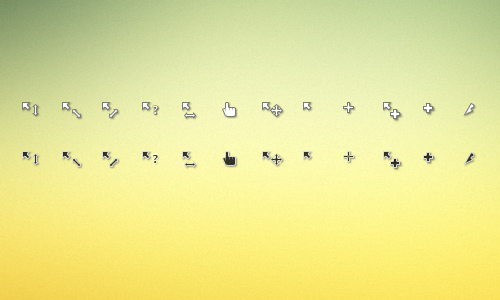
As the name suggests, simplify is a simplistic design approach that comes in both light and dark flavours. Such designs help with distraction elimination and provide a solid way to interact with your system. To install, just right click the install.inf file and choose the install option. You may then find the new cursor in the control panel and enable it.
Gaia

Gaia is a colourful and refreshing mouse cursor set that features six static and four animated cursors. This set was designed in the context of a community project to raise awareness for climate change. Gaia also comes with an automated installer for easier installation.
Wii

If you are a Wii fan/owner and want to have consistent interfaces and design among your machines then changing your PC cursor is a good first step. The set includes 18 cursors (3 animated) that follow the characteristic tilted design found in Wii gaming consoles.
Entis

Entis is a bold cursor theme that can prove very helpful for people with seeing problems like the elderly. The thick white frame does help with contrast increase, always making your pointer easy to locate. On their website, you can also find a left-handed version.
Polar


Polar theme is another simplistic and clean design approach, yet deeply informative thanks to the rotating load indicators. For those of you who prefer black, there’s also a dark version called Obsidian. To install, you right click the .INF files and choose the install option. You may then enable the newly install cursor from the Control Panel.

Transparent cursors may not sound like a good idea for those who have trouble locating their pointers, but they are very suitable for anyone who wants a mild design for a more relaxed use. Transparent cursors stay out of your way when you are using your computer and look quite elegant.

Many out there believe that Mac OS X is the epitome of elegance. For this reason, there are countless imitations aimed to bring some of Mac’s elegance to Windows systems. This cursor theme is maybe the best implementation available, boasting a comprehensive and colourfully animated Mac OS X cursor theme. To install, copy your new cursor pack to C:\Windows\Cursors and then enable it from your Control Panel.
Night Diamond

Night Diamond looks seductive and modern in every way. This completely animated theme features many cursors for any action you may need to have one. All pointers look great on this posh blue light that makes them shine in excellence. More versions with different colour tones like silver, bloody red, golden orange, amethyst and emerald green are also available.

If glass is nice, Chrome glass is even better right? This animated cursor theme provides a colouring intuition for users as it changes colours according to actions and system load. The cursor’s transparency is well adjusted and will serve your daily needs just fine.

As in everything nowadays, its all about zombies in the end! If you want a cursor that will make you feel like you are using an Umbrella corporation computer, then this cursor theme is for you. Even if you’re not a Resident Evil fan, you may find this theme interesting as it is very well designed.
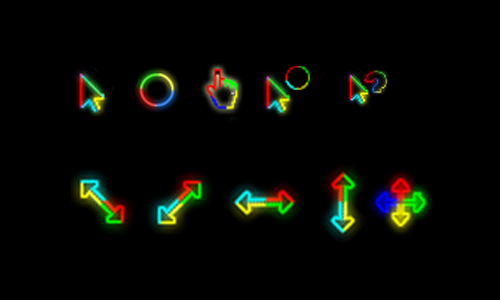
WindowsaRtist edition pack contains 10 static (CUR) cursors and 4 animated (ANI) cursors – a total of 14 cursor files. It is designed with glowing lights that is inspired by the logo of Windows'(
Paket edisi WindowsaRtist berisi 10 kursor statis (CUR) dan 4 kursor animasi (ANI) - total 14 file kursor. Ini dirancang dengan lampu bercahaya yang terinspirasi oleh logo Windows.)

Bodamor is a pack of cursors that were designed with a more feminine look. It contains 13 CUR formats and 2 ANI formats for a total of 15 cursors that you can use for your Windows PC'(Bodamor adalah paket kursor yang dirancang dengan tampilan yang lebih feminin. Ini berisi 13 format CUR dan 2 format ANI untuk total 15 kursor yang dapat Anda gunakan untuk PC Windows Anda)
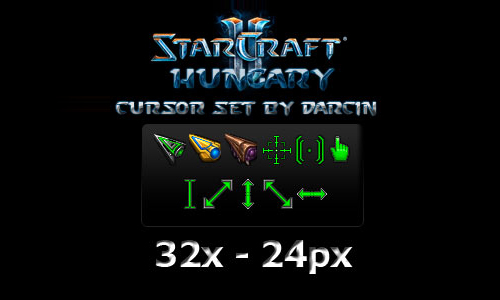
If you are a gamer and a Star Craft fanatic, then you’ll love this next cursor pack. It contains 17 cursors that are in 2 sizes: 32px and 24px. Each version have 16 CUR files and 1 ANI file.(Jika Anda seorang gamer dan penggemar Star Craft, maka Anda akan menyukai paket kursor ini. Ini berisi 17 kursor yang ada dalam 2 ukuran: 32px dan 24px. Setiap versi memiliki 16 file CUR dan 1 file ANI.)
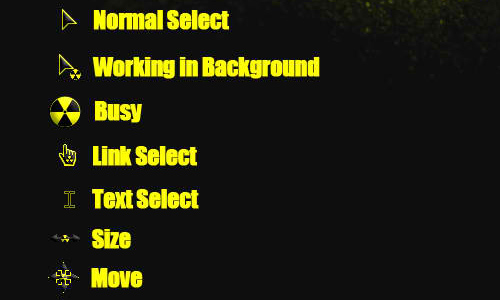
This next pack contains 12cursors in black and yellow colors. These cursors are designed based on the radioactive symbol, Most of them are animated (ANI format), 11 to be exact, while the other one is in CUR format.(Paket berikutnya berisi 12 kursor dalam warna hitam dan kuning. Kursor ini dirancang berdasarkan simbol radioaktif, Sebagian besar di antaranya animasi (format ANI), 11 tepatnya, sedangkan yang lain dalam format CUR.)
Deep Purple Cursor Set
Deep purple set comprises 15 cursors that are in purple-themed designs. The download specifically includes 13 CUR formats, 2 ANI formats, and 1 INF file named ‘Deep Purple Cursors Install’. Use this INF file to install the cursors by right clicking on it and selecting ‘Install’.(Perangkat ungu tua terdiri dari 15 kursor yang memiliki desain bertema ungu. Pengunduhan secara khusus mencakup 13 format CUR, 2 format ANI, dan 1 file INF bernama 'Deep Purple Cursors Install'. Gunakan file INF ini untuk menginstal kursor dengan mengklik kanan padanya dan memilih ‘Instal’.)